From multi-agent chaos to a harness of predictable agents and skills.
Reclaim tokens (and money!), save time, and make your Markdowns deterministic. Detects incoherence, verbosity, redundancy, bloated skills, and much more.The harness you designed, finally visible and testable: deterministic and probabilistic analysis and fixes, on one map.
Install, create an empty folder, and open your agent (Claude Code, Codex, etc). Let your agent walk you through the whole flow, live in your console and browser.
bash
$npm i -g @skill-map/cli$mkdir try-skill-map && cd try-skill-map$sm tutorial# installs the tutorial skill$claude# opens Claude Code here
Install, guided tutorial, every setting, lenses, plugins, inspector and AI actions, end to end (Spanish and English).
Ecosystem
Plugins: Six kinds. Infinite extensions.
Six ways to extend this tool. Your plugin, your company's, the community's, all run against the same kernel.
plugin kind
Provider
Defines an agent (Claude, Codex, etc)
Declares the file kinds an agent exposes (skill / agent / command for Claude), where its content lives on disk, the frontmatter schema each kind follows, and how the UI renders it (label, color, icon). The Claude provider ships built-in; write one for Codex, Copilot, or your own runner.
// claude/provider.ts (kinds live in claude/kinds/<name>/)
// id and kind come from the folder, you never write them.
export default {
  version: '0.1.0',
  description: 'Claude Code agents, commands, and skills',
  presentation: { label: 'Claude', color: '#cc785c' },
  detect: { markers: ['.claude'] },
  read: { extensions: ['.md'], parser: 'frontmatter-yaml' },
  classify: (path, fm) => /* 'agent' | 'command' | 'skill' | null */,
};
plugin kind
Extractor
Extracts data from a node
Each file is a node; an Extractor turns it into data. Links to other nodes, attributes that enrich the node, or signals you stash in your own KV store. Pure code, deterministic, runs in milliseconds inside `sm scan`, no LLM, no cost.
// claude/extractors/slash/index.ts
export default {
  version: '0.1.0',
  description: 'Link /command invocations to their target',
  scope: 'body',
  extract(ctx) {
    for (const [, cmd] of ctx.body.matchAll(SLASH_RE))
      ctx.emitLink({
        source: ctx.node.path, target: cmd,
        kind: 'invokes', confidence: 0.8,
      });
  },
};
plugin kind
Analyzer
Finds problems in the map
Looks at the whole map and spots problems: trigger collisions, orphans, dead dependencies, broken references. Write an analyzer, run it on any project, or publish it for others to use.
Actions are the only plugin kind that touches disk. Deterministic mode: straight code (rename a trigger, tweak frontmatter). Probabilistic: a prompt run by the LLM (regenerate a summary, rewrite text).
The map lives in memory; a Formatter ships it out. ASCII for terminal, Mermaid for your README, DOT for Graphviz, JSON for your pipeline. Built-ins cover the common cases; write your own for the rest.
When something happens in skill-map (scan finished, action executed, job failed), a Hook reacts. Send it to Slack, fire a webhook, gate a spawn before it starts. There are ten events you can subscribe to.
// integrations/hooks/slack-on-failure/index.ts
export default {
  version: '0.1.0',
  description: 'Post to Slack when a job fails',
  triggers: ['job.failed'],
  on(ctx) {
    slack.post('#alerts', ctx.jobResult);
  },
};
Static analysis runs in milliseconds, offline. Then queue a semantic job and your own AI agent reads a node for meaning: redundancy, a trigger that will misfire, vague or contradictory instructions, even content trying to manipulate the agent. One map, two angles.
Token weight per node
Per-node byte and token counts. Find the bloated skill that's eating your context window.
Cross-references
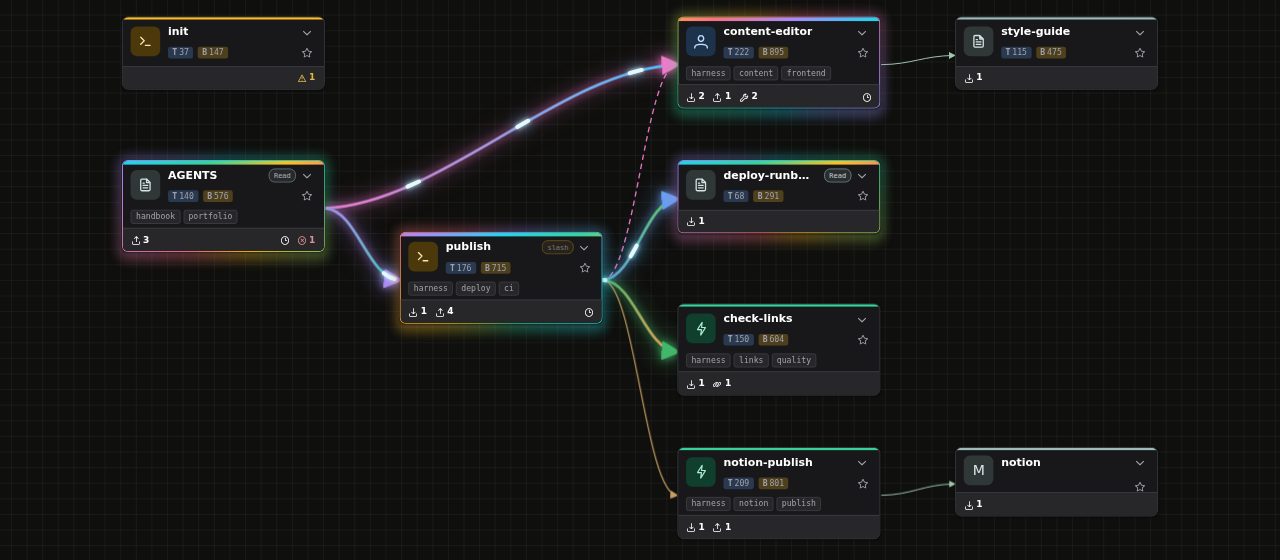
Every link between files: /slash invocations, @-mentions, imports, URLs. The directory becomes a map.
Broken refs
References pointing to triggers that don't exist. You catch them at scan time, before the agent drops the ball.
Vague, incoherent, redundant
Instructions too soft to follow, terms used three ways, the same thing said twice. The semantic analyzers catch what a regex cannot see.
External deps
Lists every external URL that appears in your workspace. Audit your supply chain.
Use cases
Built for people who live in Markdown.
No promises, no magic. Just a map over the files you already have.
For authors
Optimize before you publish.
Before you publish a skill, see it in context: what it duplicates elsewhere, where it repeats itself, how many tokens it costs. Tighten it while it is still yours to change.
For AI architects & platform teams
See the harness you designed, not the one that drifted.
Point it at your project, or the roots you hand it, and the design you intended lines up with what is actually on disk: divergent copies of a skill, an agent nothing references, a rule that quietly rotted.
For agent debuggers
Watch what your agent actually ran.
Leave the map open and each node lights up the moment your runtime invokes it: the skill it loaded, the agent it delegated to, the file it read. Open a delegation edge and read the exact prompt and reply. No log tailing.
For tool builders
Build on top of the map.
Every operation has a CLI verb, a JSON output, and a plugin hook, and your agent can drive the whole thing over MCP. Wire skill-map into your CI, your dashboard, or your LLM workflow, without forking the kernel.
Quotes
What people who use it say.
“Found 14 trigger collisions across our internal agent fleet on the first run. We'd been debugging the resulting misfires for weeks.”
MC
Maya Chen
Platform Lead, Finch Labs
“The orphan check alone is worth it. We had 38 skills defined but never referenced. Dead code, just for agents.”
JR
Jordan Reyes
Skill author · Anthropic Builders
“I run sm in CI. If a PR introduces a collision or an external dep we don't allow-list, the build fails. End of debate.”
PV
Priya Vasquez
Eng Manager, Recurse
Stop reading dirs. Start reading maps.
See your entire agent harness at a glance. Time to design it right!